Building PolyTrack's Track Lab: Decoding Track Strings for Players & Reviewers
Building PolyTrack's Track Lab: Decoding Track Strings for Players & Reviewers · Jason Guo · 2026-07-16 · polytrack, game tools, codes, blog
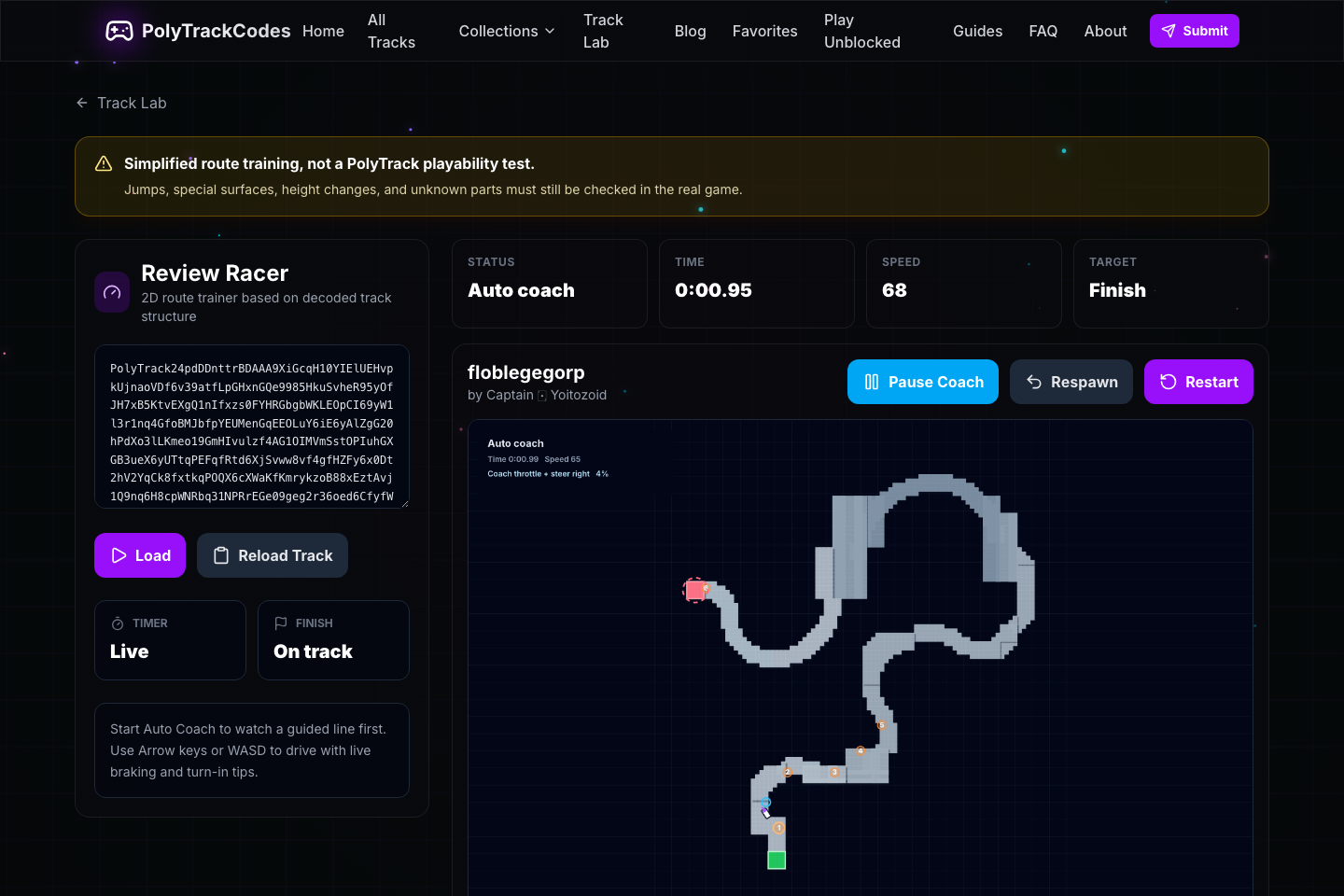
Most software tells you what it has done. A track code does the opposite: it hides the interesting part. In PolyTrack, a whole custom racing track can travel around as one long string. That is a neat format for sharing, but a fairly poor format for understanding. Before opening the game, a player cannot see the route, the elevation changes, the likely difficult sections, or whether the code contains parts that an analysis tool does not understand. I started building Track Lab because I wanted to close that gap. I also wanted to be honest about what a browser tool can and cannot prove. Open Track Lab The uncomfortable question behind the project The first version was easy to describe: decode a PolyTrack2 code, draw the blocks, and let a small browser racer follow the result. The hard question was not “can I make the map render?” It was “what am I allowed to conclude from that map?” An automatic car completing a simplified route does not mean the original track is playable in the real game. A decoded part ID does not mean I understand every surface, jump, or transition. A green badge can make an approximation sound like a guarantee, especially when the person reading it has no reason to inspect the underlying data. That distinction changed the direction of the work. Track Lab should be useful to players and reviewers, but it should not manufacture confidence. I split the product before adding more features There are two very different people who open this kind of tool. The player wants to answer: “What kind of track is this, and how should I practise it?” The reviewer wants to answer: “What evidence do I have about this submission, and which parts still need a real-game check?” I kept the analysis shared, but separated the experiences. The public side became a player-facing analysis and practice centre. The reviewer side lives in the submission dashboard, where a result can be saved with the checked code version and a human note. That separation removed a surprising amount of clutter. Players do not need internal approval language. Reviewers do not need the player interface to pretend that a practice session is a formal test. The analyzer is deliberately less dramatic than the code The new Track Analyzer starts with the questions I would ask as a player: - Is there a start and a finish? - Are checkpoints present? - How much of the track structure is recognised? - What is the approximate height range? - Which parts need confirmation in the real game? The result is phrased as normal , needs attention , problem found , or unable to determine . I chose those labels because uncertainty deserves its own state. If an unknown component is silently counted as ordinary road, the interface is not simplifying the data; it is distorting it. The map is still there for people who want to investigate. It can be zoomed, dragged, filtered by road or control parts, and separated by height layer. Raw coordinates remain available as advanced information, but they are not the first thing a player has to decode. The height profile is labelled as an estimate. That small label matters. It tells the reader what kind of knowledge they are looking at, rather than letting a clean chart imply more precision than the data supports. Review Racer became a practice surface, not a game replacement I kept the name Review Racer, but added a permanent explanation underneath it: > 2D route trainer based on decoded track structure That sentence is the boundary. The trainer can demonstrate a suggested line, show a target speed, mark a risky turn, and let a player start from a particular sector. It supports keyboard driving on desktop and large touch controls on mobile. It also keeps a personal best locally, so practising does not require creating another account or uploading a private code. The wording of the result is conservative: simplified route connected , route gap found , or current tool cannot determine . A successful Auto Coach run is useful evidence that the decoded structure can produce a connected two-dimensional path. It is not evidence that the same path behaves correctly under PolyTrack’s physics. That may sound like a limitation to apologise for. I think it is the opposite. A tool becomes more useful when the user knows where its useful range ends. Mobile changed my definition of “working” The first prototype looked acceptable on a phone because the canvas scaled down. That was not the same as being usable. For a player, mobile support means being able to do something. Review Racer now provides Left, Drive, Brake, and Right controls with enough space to use them without precision tapping. This was a useful reminder that responsive layout is not the same as responsive product design. A feature that can be seen on a smaller screen is not necessarily a feature that can be used there. Large tracks taught me to stop earlier The largest tracks in the collection were where the original optimism became expensive. Building a full practice model for every decoded block could leave the page busy for too long, or make a player think the track itself was damaged when the real problem was the tool’s limit. The safer behaviour is now straightforward: 1. Decode and show the structural information. 2. Stop route training when the track is beyond the safe limit or too poorly supported. 3. Explain that the limitation belongs to the current tool. 4. Leave the player with a map and a clear instruction to confirm the uncertain areas in the real game. Graceful refusal is a real product feature. It protects the page from freezing and protects the player from a misleading diagnosis. The reviewer view is about memory The reviewer workflow has one job the public page does not: remember what happened. When a reviewer checks a submission, the saved record includes the analysis version, a fingerprint of the code, the recognised coverage, unknown parts, the availability of the simplified trainer, and the reviewer’s own note. If the creator changes the code later, the old result is marked out of date. That closes a subtle but important gap. “We checked this track” is incomplete unless we can also answer “which version did we check?” The tool gives evidence and suggestions. It does not make the final publishing decision. What I tested before calling it useful I built a fixed set of 31 PolyTrack2 tracks covering small layouts, large layouts, missing starts and finishes, low-support content, and unusual community tracks. In total, the set contained 84,087 decoded parts. Twenty tracks produced a route suitable for the simplified trainer. Eleven were safely limited because they were too large or had too little supported route data. I also checked the important browser paths: desktop Auto Coach, keyboard driving, mobile touch controls, large-track protection, and the absence of ads over the tool controls. Those numbers are not a claim that the decoder understands PolyTrack completely. They are a repeatable baseline. When new components are added, I want to know whether the tool becomes more capable without becoming more confident than it deserves to be. The part I am still thinking about The most interesting result of this project was not the map. It was the vocabulary around the map. Software often rewards a binary answer: pass or fail, ready or broken, playable or not playable. Real-world tools frequently operate in the space between those answers. They have partial coverage, missing context, and evidence that is useful without being conclusive. For Track Lab, making that middle space visible improved both sides of the product. Players get a better explanation of what they are looking at. Reviewers get a record they can revisit. I get a safer foundation for improving the decoder instead of hiding its unfinished areas behind confident colours. The next work is fairly concrete: recognise more special components, improve jump and multi-level analysis, compare a player’s line with the suggested one, and use real player feedback to tune the practice advice. I am intentionally leaving community challenges and public leaderboards for later. Those features are attractive, but they only make sense after the underlying analysis has earned enough trust. For now, Track Lab does one useful thing: it turns an opaque track code into something a player can inspect, question, and practise—while being honest about what still needs to be checked in the real game. If you try it, I would be interested in the parts where the explanation feels useful and the parts where it still feels too cautious. Try Track Lab